
How to populate information on multiple sheets at once
Solved/Closed
JPSpark
Posts
8
Registration date
Tuesday 27 December 2016
Status
Member
Last seen
2 May 2017
-
28 Dec 2016 à 23:45
TrowaD Posts 2921 Registration date Sunday 12 September 2010 Status Contributor Last seen 27 December 2022 - 2 May 2017 à 11:00
TrowaD Posts 2921 Registration date Sunday 12 September 2010 Status Contributor Last seen 27 December 2022 - 2 May 2017 à 11:00
Related:
- How to populate information on multiple sheets at once
- Google sheets download - Download - Spreadsheets
- How to delete multiple files at once on mac - Guide
- How to split excel sheet into multiple worksheets - Guide
- How to copy data from one excel sheet to another - Guide
- Google sheets right to left - Guide
5 responses
TrowaD
Posts
2921
Registration date
Sunday 12 September 2010
Status
Contributor
Last seen
27 December 2022
555
3 Jan 2017 à 12:03
3 Jan 2017 à 12:03
Hi JPSpark,
The link doesn't work.
The code would look something like this :
When you confirm a value in column A of your main sheet, then that value will be copied to Sheet2 the first available row in column A.
Column B will be copied to Sheet3 and column C will be copied to Sheet4.
Find those reference in the code and change them to match your scenario.
To use the code: Right-click your main sheets tab and select View Code. Paste the code in the big white field.
The link doesn't work.
The code would look something like this :
Private Sub Worksheet_Change(ByVal Target As Range)
If Not Intersect(Target, Columns("A:A")) Is Nothing Then
    Target.Copy Sheets("Sheet2").Range("A" & Rows.Count).End(xlUp).Offset(1, 0)
End If
If Not Intersect(Target, Columns("B:B")) Is Nothing Then
    Target.Copy Sheets("Sheet3").Range("A" & Rows.Count).End(xlUp).Offset(1, 0)
End If
If Not Intersect(Target, Columns("C:C")) Is Nothing Then
    Target.Copy Sheets("Sheet4").Range("A" & Rows.Count).End(xlUp).Offset(1, 0)
End If
End Sub
When you confirm a value in column A of your main sheet, then that value will be copied to Sheet2 the first available row in column A.
Column B will be copied to Sheet3 and column C will be copied to Sheet4.
Find those reference in the code and change them to match your scenario.
To use the code: Right-click your main sheets tab and select View Code. Paste the code in the big white field.
TrowaD
Posts
2921
Registration date
Sunday 12 September 2010
Status
Contributor
Last seen
27 December 2022
555
19 Jan 2017 à 11:07
19 Jan 2017 à 11:07
Hi JPSpark,
Sorry for the late reply.
If you are still in need of assistance then re-upload your file for me to look at.
Best regards,
Trowa
Sorry for the late reply.
If you are still in need of assistance then re-upload your file for me to look at.
Best regards,
Trowa
TrowaD
Posts
2921
Registration date
Sunday 12 September 2010
Status
Contributor
Last seen
27 December 2022
555
19 Jan 2017 à 11:38
19 Jan 2017 à 11:38
Hi JPSpark,
OK, I got your file now.
So if I understand correctly you want to copy a new entry in columns B:D on sheet "Bid List" and paste it to columns D:F on sheet "TO Sheet". And you want this to happen automatically.
With the code below implemented, when you confirm your data in colmn D on sheet "Bid List", columns B:D of that row will be pasted to the "TO Sheet" first available row based on column D.
To implement the code below, right-click the "Bid List" sheets tab and select "View code". Paste the code in the big white field.
Here is the code:
Best regards,
Trowa
OK, I got your file now.
So if I understand correctly you want to copy a new entry in columns B:D on sheet "Bid List" and paste it to columns D:F on sheet "TO Sheet". And you want this to happen automatically.
With the code below implemented, when you confirm your data in colmn D on sheet "Bid List", columns B:D of that row will be pasted to the "TO Sheet" first available row based on column D.
To implement the code below, right-click the "Bid List" sheets tab and select "View code". Paste the code in the big white field.
Here is the code:
Private Sub Worksheet_Change(ByVal Target As Range)
If Intersect(Target, Columns("D:D")) Is Nothing Then Exit Sub
Range(Cells(Target.Row, "B"), Cells(Target.Row, "D")).Copy _
Sheets("TO Sheet").Range("D" & Rows.Count).End(xlUp).Offset(1, 0)
End Sub
Best regards,
Trowa
JPSpark
Posts
8
Registration date
Tuesday 27 December 2016
Status
Member
Last seen
2 May 2017
13 Feb 2017 à 11:47
13 Feb 2017 à 11:47
Hi Trowa,
Thank you so much for your help. I applied the code as you instructed and it works. After applying the code I realized that the way I handle the Master sheet I would need to make the TO Sheet a separate sheet outside of the workbook. How can I edit this code to make it work how i need it?
Thank you so much in advance.
Thank you so much for your help. I applied the code as you instructed and it works. After applying the code I realized that the way I handle the Master sheet I would need to make the TO Sheet a separate sheet outside of the workbook. How can I edit this code to make it work how i need it?
Thank you so much in advance.
TrowaD
Posts
2921
Registration date
Sunday 12 September 2010
Status
Contributor
Last seen
27 December 2022
555
14 Feb 2017 à 12:07
14 Feb 2017 à 12:07
Hi JPSpark,
You want to remove the TO Sheet from your workbook and create a new workbook just for that single sheet. What could be the reason for that?
Keeping all sheets together in one workbook makes processing data easier and faster.
Do enlighten me.
Best regards,
Trowa
You want to remove the TO Sheet from your workbook and create a new workbook just for that single sheet. What could be the reason for that?
Keeping all sheets together in one workbook makes processing data easier and faster.
Do enlighten me.
Best regards,
Trowa
JPSpark
Posts
8
Registration date
Tuesday 27 December 2016
Status
Member
Last seen
2 May 2017
>
TrowaD
Posts
2921
Registration date
Sunday 12 September 2010
Status
Contributor
Last seen
27 December 2022
1 Mar 2017 à 07:40
1 Mar 2017 à 07:40
Thank you for your response and I couldn't agree with you more. It is probably my lack of knowledge of excel that prompted me to this method. To make changes to the workbook I have it prompting for a password. I'm the only one that can make changes to the book and my colleagues can only view it in read-only. The only page anyone can make changes to is the TO sheet which is in the workbook you saw, but I currently have it separated as a separate sheet. As I'm typing this I'm remembering reading somewhere a way to have just that one page unlocked. Maybe you can shed some light into this.
Thanks again for all of your help.
Thanks again for all of your help.
TrowaD
Posts
2921
Registration date
Sunday 12 September 2010
Status
Contributor
Last seen
27 December 2022
555
6 Mar 2017 à 11:48
6 Mar 2017 à 11:48
Hi JPSpark,
Next to the option to protect your workbook, there is also the option to protect a single sheet (or right-click the sheets tab to find the option as well). So disable the workbook protection and enable the worksheet protection.
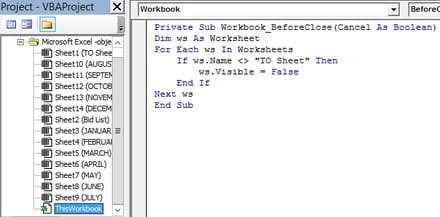
To make it more clear which sheet your colleagues are suppose to use, consider this piece of code. It will hide all sheets, except for the TO sheet, when you close the workbook. When you open the workbook, you can right-click the sheets tab to unhide a specific sheet and alter it. When a colleague opens the workbook only the TO sheet is visible. Could be a nice addition.
The code needs to be placed under ThisWorkbook (see pic). Here is the code:
Best regards,
Trowa
Next to the option to protect your workbook, there is also the option to protect a single sheet (or right-click the sheets tab to find the option as well). So disable the workbook protection and enable the worksheet protection.
To make it more clear which sheet your colleagues are suppose to use, consider this piece of code. It will hide all sheets, except for the TO sheet, when you close the workbook. When you open the workbook, you can right-click the sheets tab to unhide a specific sheet and alter it. When a colleague opens the workbook only the TO sheet is visible. Could be a nice addition.
The code needs to be placed under ThisWorkbook (see pic). Here is the code:
Private Sub Workbook_BeforeClose(Cancel As Boolean)
Dim ws As Worksheet
For Each ws In Worksheets
    If ws.Name <> "TO Sheet" Then
        ws.Visible = False
    End If
Next ws
End Sub

Best regards,
Trowa
JPSpark
Posts
8
Registration date
Tuesday 27 December 2016
Status
Member
Last seen
2 May 2017
20 Mar 2017 à 14:02
20 Mar 2017 à 14:02
I just noticed that I was working off an updated version of the sheet I submitted to you and not the old one you provided the code for. Let me retry this and I'll let you know how I make out.
thanks again
thanks again
JPSpark
Posts
8
Registration date
Tuesday 27 December 2016
Status
Member
Last seen
2 May 2017
>
JPSpark
Posts
8
Registration date
Tuesday 27 December 2016
Status
Member
Last seen
2 May 2017
20 Mar 2017 à 15:15
20 Mar 2017 à 15:15
Hi Trowa,
Could you please revise the code to work based on this layout? I tried googling to see if I could make this work on my own but it just confused me more. https://www.dropbox.com/s/1rnoxpeicilcsv1/MAstersheert%20codes.pdf?dl=0
Thank you for all your help.
Could you please revise the code to work based on this layout? I tried googling to see if I could make this work on my own but it just confused me more. https://www.dropbox.com/s/1rnoxpeicilcsv1/MAstersheert%20codes.pdf?dl=0
Thank you for all your help.
TrowaD
Posts
2921
Registration date
Sunday 12 September 2010
Status
Contributor
Last seen
27 December 2022
555
21 Mar 2017 à 12:02
21 Mar 2017 à 12:02
Hi JPSpark,
VBA can be quit confusing indeed.
Here is the revised code:
Best regards,
Trowa
VBA can be quit confusing indeed.
Here is the revised code:
Private Sub Worksheet_Change(ByVal Target As Range)
If Intersect(Target, Columns("D:D")) Is Nothing Then Exit Sub
Sheets("TO Sheet").Range("A" & Rows.Count).End(xlUp).Offset(1, 0) = _
Cells(Target.Row, "B")
Sheets("TO Sheet").Range("B" & Rows.Count).End(xlUp).Offset(1, 0) = _
Cells(Target.Row, "D")
Sheets("TO Sheet").Range("C" & Rows.Count).End(xlUp).Offset(1, 0) = _
Cells(Target.Row, "C")
End Sub
Best regards,
Trowa
JPSpark
Posts
8
Registration date
Tuesday 27 December 2016
Status
Member
Last seen
2 May 2017
2 May 2017 à 08:52
2 May 2017 à 08:52
Thank you so much. This worked perfectly.
TrowaD
Posts
2921
Registration date
Sunday 12 September 2010
Status
Contributor
Last seen
27 December 2022
555
2 May 2017 à 11:00
2 May 2017 à 11:00
Great!

3 Jan 2017 à 16:42
This Link should work.......
https://www.dropbox.com/s/bibikpoql8u9qwt/Mastersheet.pdf?dl=0
4 Jan 2017 à 22:06