
Match & add missed items between two sheets
Solved/Closed
abdomegahri
Posts
15
Registration date
Wednesday March 3, 2021
Status
Member
Last seen
February 8, 2022
-
Jan 12, 2022 at 03:35 AM
TrowaD Posts 2921 Registration date Sunday September 12, 2010 Status Contributor Last seen December 27, 2022 - Feb 8, 2022 at 11:32 AM
TrowaD Posts 2921 Registration date Sunday September 12, 2010 Status Contributor Last seen December 27, 2022 - Feb 8, 2022 at 11:32 AM
Related:
- Match & add missed items between two sheets
- Outlook duplicate items remover (odir) - Download - Email
- Google sheets download - Download - Spreadsheets
- Little alchemy all items - Guide
- Music match jukebox - Download - Audio playback
- 2007 microsoft office add-in microsoft save as pdf or xps - Download - Other
2 responses
TrowaD
Posts
2921
Registration date
Sunday September 12, 2010
Status
Contributor
Last seen
December 27, 2022
555
Feb 1, 2022 at 12:09 PM
Feb 1, 2022 at 12:09 PM
Hi Abdomeghari,
I placed the result I had to work towards in columns G:I. These are not used by the code, but do give a nice comparison.
Before running the code:

And after:

There are some differences, but if you look closely you notice that the code is right :).
Here is the code:
Best regards,
Trowa
I placed the result I had to work towards in columns G:I. These are not used by the code, but do give a nice comparison.
Before running the code:
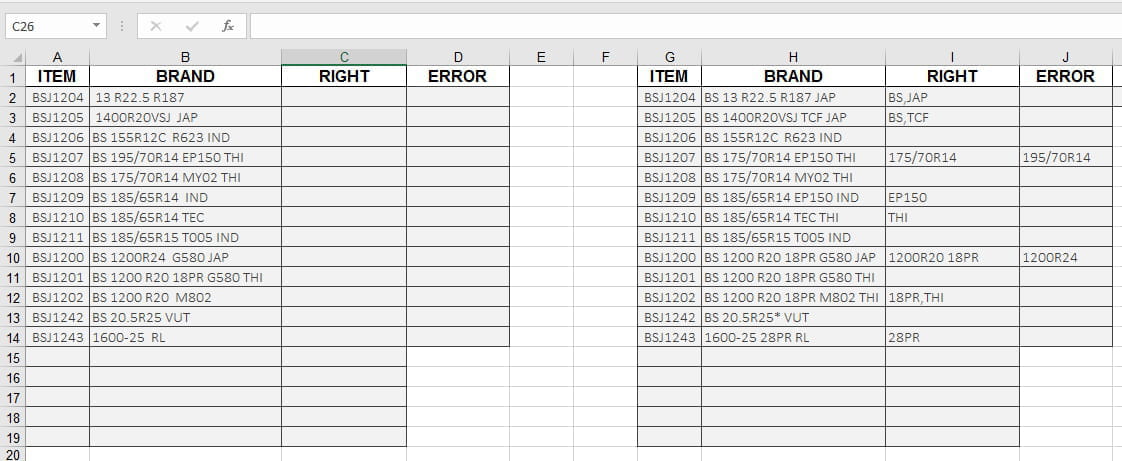
And after:

There are some differences, but if you look closely you notice that the code is right :).
Here is the code:
Sub RunMe()
Dim cItem As Range
Dim sPart, ePart, cLen1, cLen2 As Integer
Dim rPart, cBrand As String

Sheets("MISSED").Select

For Each cell In Range("B2:B14")
    cell.Replace What:="  ", Replacement:=" ", LookAt:=xlPart
    cell.Value = Trim(cell.Value)
    Set cItem = Sheets("COMPLETE").Columns("A").Find(cell.Offset(0, -1))
    cBrand = cItem.Offset(0, 1).Value
    cell.Offset(0, 1).Value = cBrand
    sPart = 0
    ePart = Application.WorksheetFunction.Find(" ", cell.Value)
    Do
        rPart = Mid(cell.Value, sPart + 1, ePart - (sPart + 1))
        cLen1 = Len(cell.Offset(0, 1).Value)
        cell.Offset(0, 1).Replace What:=rPart & " ", Replacement:=vbNullString, LookAt:=xlPart
        cLen2 = Len(cell.Offset(0, 1).Value)
        If cLen1 = cLen2 Then cell.Offset(0, 2).Value = rPart
        sPart = ePart
        On Error GoTo EH
        ePart = Application.WorksheetFunction.Find(" ", cell.Value, sPart + 1)
    Loop Until sPart = ePart
CONT:
    With cell.Offset(0, 1)
        .Value = Trim(cell.Offset(0, 1).Value)
        .Replace What:=" ", Replacement:=",", LookAt:=xlPart
    End With
    cell.Value = cBrand
Next cell
Exit Sub
EH:
ePart = Len(cell.Value) + 1
rPart = Mid(cell.Value, sPart + 1, ePart - (sPart + 1))
cell.Offset(0, 1).Replace What:=rPart, Replacement:=vbNullString, LookAt:=xlPart
On Error GoTo -1
GoTo CONT
End Sub
Best regards,
Trowa
TrowaD
Posts
2921
Registration date
Sunday September 12, 2010
Status
Contributor
Last seen
December 27, 2022
555
Jan 13, 2022 at 12:03 PM
Jan 13, 2022 at 12:03 PM
Hi Abdo,
Not sure if this is possible.
Finding this string "13 R22.5 R187 " in this one "BS 13 R22.5 R187 JAP" and show what is missing can be done. But finding this one "BS 1200 R20 M802 " in this one "BS 1200 R20 18PR M802 THI" is too much.
We could skip the last part and search for "BS 1200 R20", but then we would also find "BS 1200 R20 18PR G580 THI" and "BS 1200 R20 G580 JAP". With that last one "BS 1200 R20 G580 JAP", we would need to skip the last 2 parts to find its match.
I don't see how this can be done.
Best regrads,
Trowa
Not sure if this is possible.
Finding this string "13 R22.5 R187 " in this one "BS 13 R22.5 R187 JAP" and show what is missing can be done. But finding this one "BS 1200 R20 M802 " in this one "BS 1200 R20 18PR M802 THI" is too much.
We could skip the last part and search for "BS 1200 R20", but then we would also find "BS 1200 R20 18PR G580 THI" and "BS 1200 R20 G580 JAP". With that last one "BS 1200 R20 G580 JAP", we would need to skip the last 2 parts to find its match.
I don't see how this can be done.
Best regrads,
Trowa
abdomegahri
Posts
15
Registration date
Wednesday March 3, 2021
Status
Member
Last seen
February 8, 2022
Jan 13, 2022 at 01:02 PM
Jan 13, 2022 at 01:02 PM
HI Trowa,
I knew it . this is the big challenge. so I accept any alternative you suggest.
just tell me what's the right way you see it .
thanks
I knew it . this is the big challenge. so I accept any alternative you suggest.
just tell me what's the right way you see it .
thanks
TrowaD
Posts
2921
Registration date
Sunday September 12, 2010
Status
Contributor
Last seen
December 27, 2022
555
>
abdomegahri
Posts
15
Registration date
Wednesday March 3, 2021
Status
Member
Last seen
February 8, 2022
Jan 25, 2022 at 11:41 AM
Jan 25, 2022 at 11:41 AM
Hi Abdo,
With the data you have, I don't see a way. I've shown you where the issue is. It is up to you to present the data is a different way. But I'm not sure that is possible for you. For me to be able to help you, there needs to be some kind of logic to your data.
Best regards,
Trowa
With the data you have, I don't see a way. I've shown you where the issue is. It is up to you to present the data is a different way. But I'm not sure that is possible for you. For me to be able to help you, there needs to be some kind of logic to your data.
Best regards,
Trowa
abdomegahri
Posts
15
Registration date
Wednesday March 3, 2021
Status
Member
Last seen
February 8, 2022
>
TrowaD
Posts
2921
Registration date
Sunday September 12, 2010
Status
Contributor
Last seen
December 27, 2022
Jan 26, 2022 at 03:22 AM
Jan 26, 2022 at 03:22 AM
Hi TrowaD,
thanks again for following my question and try to help me.
to understand why I give you data are not logic as you see. actually theses reports issue by another company and send me by email . I do my best . I know the excel doesn't deal with all of the cases as what I want . there is rules and constrains to achieve some projects. so I would add helper column may be it help you . I amended the data by insert column A between sheets (complete,missed) should match between two sheets based on column A if there are some items are missed or wrong then should correct the items in column B into sheet missed based on sheet complete and show the item is corrected in column C and the error in column D
NOTE: the missed & corrected items should be in column C, as to column D just show the error
the pictures
sheet COMPLETE
SHEET MISSED

expected result in sheet MISSED

Best regards,
abdomeghari
thanks again for following my question and try to help me.
to understand why I give you data are not logic as you see. actually theses reports issue by another company and send me by email . I do my best . I know the excel doesn't deal with all of the cases as what I want . there is rules and constrains to achieve some projects. so I would add helper column may be it help you . I amended the data by insert column A between sheets (complete,missed) should match between two sheets based on column A if there are some items are missed or wrong then should correct the items in column B into sheet missed based on sheet complete and show the item is corrected in column C and the error in column D
NOTE: the missed & corrected items should be in column C, as to column D just show the error
the pictures
sheet COMPLETE
SHEET MISSED
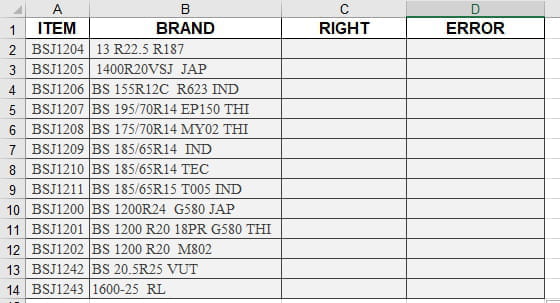
expected result in sheet MISSED

Best regards,
abdomeghari
TrowaD
Posts
2921
Registration date
Sunday September 12, 2010
Status
Contributor
Last seen
December 27, 2022
555
>
abdomegahri
Posts
15
Registration date
Wednesday March 3, 2021
Status
Member
Last seen
February 8, 2022
Jan 27, 2022 at 12:11 PM
Jan 27, 2022 at 12:11 PM
Hi Abdomeghari,
I understand that you can't choose how the data is presented to you. At least know, with the addition of the extra column, we know which cells should match.
I'll play around with it and get back to you.
Best regards,
Trowa
I understand that you can't choose how the data is presented to you. At least know, with the addition of the extra column, we know which cells should match.
I'll play around with it and get back to you.
Best regards,
Trowa

Feb 1, 2022 at 02:42 PM
honestly it's fantastic !
but I have a problem about last items THI or JAP . if I make mistake like THAI or JAPN . it doesn't show the error just show the right is THI, JAP .
it should also show in column error THAI, JAPN .
may you fix it,please? .
Feb 3, 2022 at 12:04 PM
Good to hear!
It seems I forgot to make the range on code line 8 dynamic, but that didn't face you.
To solve the issue you mentioned, replace code lines 34 to 37:
With this part:
Best regards,
Trowa
Feb 4, 2022 at 12:30 PM
excellent ! just last thing as you said if you can make the range dynamic in this line
For Each cell In Range("B2:B14")
I don't want changing the range every time when increase data I mean in this line .
best regards,
abdomeghari
Feb 7, 2022 at 11:31 AM
Sure, here is the replacement line:
For Each cell In Range("B2:B" & Range("B2").End(xlDown).Row)Best regards,
Trowa
Feb 7, 2022 at 03:05 PM
I don't find mark THANK and mark SOLVED to close this thread
anyway thanks very much for answering with this complicated project .
best regards ,
abdomeghari