
How to remove Yahoo safe search: from Chrome, Mac, Safari


In Yahoo Search there is a SafeSearch feature that is designed to restrict certain types of content. This tutorial will teach you how to turn off the SafeSearch feature of Yahoo Search.
To disable SafeSearch feature:
- Sign-in to Yahoo and make a random search.
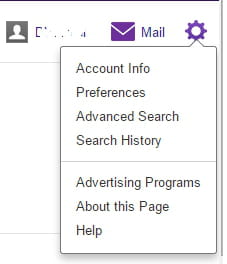
- Then, click the Settings button (represented by a cog icon) displayed at the top right corner of the result page.
- Now, click on Preferences:
- Then, click on the SafeSearch menu and select Off - do not filter results:

- Now, scroll to the bottom of the page, then click Save.
Need more help with Yahoo? Check out our forum!
Subject
Replies