
Disable hardware acceleration Chrome: shortcut, registry


Hardware acceleration refers to when a software uses support from computer hardware in order to speed up processes, namely those that are repetitive in nature. Google Chrome does this. However, you may disable it at any time.
How to turn off hardware acceleration Chrome?
Open Google Chrome, and click Customize and Control Google Chrome > Settings > Show advanced settings. In the System section, uncheck the box next to Use hardware acceleration when available, and restart Google Chrome:
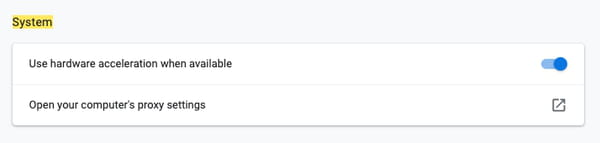
N.B. Upon disabling hardware acceleration in Windows 8/8.1, you won't be able to use Google Chrome in Modern UI mode.
There is a shortcut to quickly check if hardware acceleration is enable in Chrome by entering chrome://gpu in the search bar.
How to disabled hardware acceleration in Chrome with the Windows Registry?
There is a secondary method for disabling hardware acceleration in Chrome through the Windows Registry:
-
Go to the registry, (Windows + R) to bring up the run window.
-
Type regedit in the box and then hit enter.
-
Go to HKEY_LOCAL_MACHINE —-SOFTWARE —-Policies —- Google —-Chrome and then right-click on Chrome.
-
Then choose "new" - "DWORD 32-bit value"
-
Leave the name as "HardwareAccelerationModeEnabled"
-
Then set the data value to "0" to turn It off. To turn it on, use "1" instead.
-
Once you've finished, restart your PC for the changes to take effect.
Need more help with Google chrome? Check out our Forum!